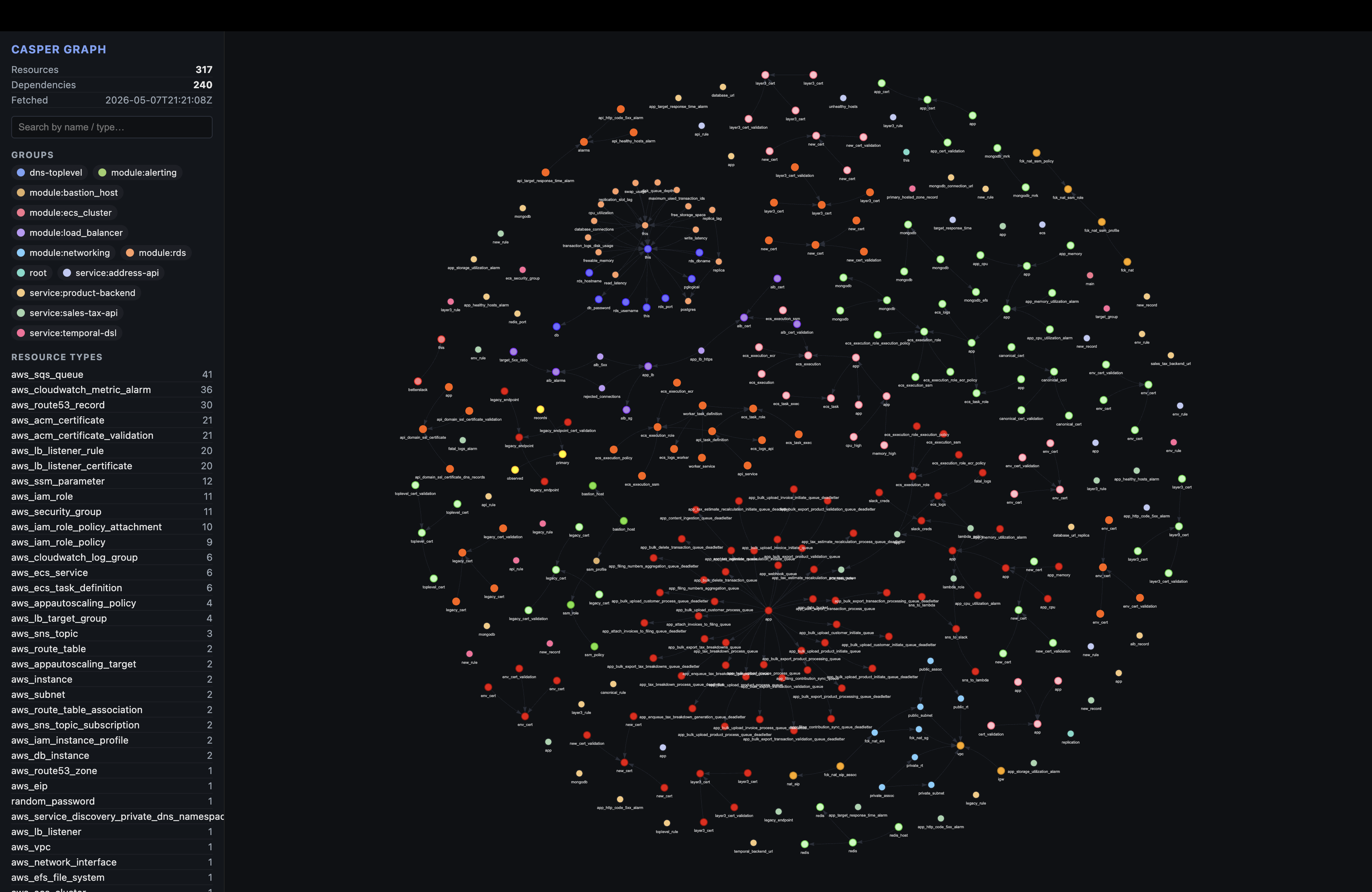
Casper exposes typed MCP tools that return structured JSON against the in-memory graph built from your Terraform repo at startup. Casper never writes Terraform or AWS resources; render_graph is the one tool that touches disk, and only to write a local HTML graph. The graph hot-reloads on every .tf / .tfstate change via fsnotify, so the answers your agent gets are always up to date with the current files on disk.
Get started
Installing the npm package auto-detects every MCP client on your machine - Claude Code, Claude Desktop, Cursor, and Codex - and wires each one up at user scope. Quick walks through the install + restart flow. Manual gives you the raw config snippet for each client if you’d rather wire it up by hand.
get started
No init command. Install auto-wires every MCP client it detects.
01
Install
Auto-detects Claude Code, Claude Desktop, Cursor, and Codex on your machine and wires each one up. No init command needed.
$ npm install -g casper-mcp
02
Restart your MCP client
Quit and reopen Claude Code, Claude Desktop, Cursor, or Codex CLI. The Casper server starts automatically. The graph view (casper/graph.html) materializes the first time you run /casper or call render_graph.
$ # Cmd+Q, then reopen
03
Use it
In Claude Code, run /casper for a guided session. In any client, just ask infra questions. The agent will reach for Casper's tools.
$ /casper
The graph renders to casper/graph.html and stays in sync as your Terraform changes. Delete it and it regenerates within ~5 seconds.
Context graph
Everything Casper exposes - every tool, every answer - is backed by a single in-memory data structure called the context graph. It’s a typed view of your Terraform infrastructure that the agent queries instead of reading raw files.
casper/graph.html - rendered from a live Terraform repo
What it is
The graph is a directed, attributed graph held in memory by the MCP server for the duration of the session. Every Terraform concept becomes a typed entity:
Nodes. Resources, data sources, module calls, and module definitions. Each carries its full attribute set, tags, and source path.
Edges. References, depends_on relationships, and module input/output wiring. Edges are typed and traversable in both directions.
Conventions. An aggregated view of how resource types are configured across the repo: common args, modal values, recurring tag keys.
Policies. Rules from .rego files (preferred) or .casper/policies.yaml evaluated against the graph; violations attach to affected resources.
How it’s made
On startup Casper runs a four-stage pipeline against the directory you point it at:
01
Scan
Walk the tree, collect every .tf and .tfstate file (skipping vendored modules and .terraform caches).
02
Parse
Use HashiCorp's HCL parser to extract resource blocks, attributes, references, and module calls into typed records.
03
Link
Resolve cross-file references and depends_on into directed edges. Module calls are wired to their definitions.
04
Index
Compute conventions, evaluate policies, and build the lookup tables that power every MCP tool.
Stays in sync
An fsnotify watcher runs alongside the server. Any save, edit, or delete of a .tf or .tfstate file triggers a debounced rescan and atomic graph swap. The next tool call always sees the current state of your repo - no restart, no manual reload.
Why a graph
Casper resolves resources, references, modules, policies, and state once at parse time, then tools query the graph instead of rereading raw Terraform. Token cost stays flat regardless of repo size, dependency walks are O(1) per hop, and policies and drift detection have a structured surface to evaluate against.
Policies
Bring your own policies, or use simple YAML
Casper checks org policy on every simulate_impact call. If the repo has any .rego files, they’re the source of truth (compatible with existing Conftest libraries). Otherwise Casper falls back to a simple YAML format in .casper/policies.yaml. Zero config either way.
01
Discover
On startup Casper walks the repo for .rego files; falls back to .casper/policies.yaml when none exist.
02
Compile
Rego policies are compiled once via the embedded OPA engine. YAML rules are parsed into typed checks.
03
Check
Every simulate_impact and dump_graph call evaluates the loaded engine against affected resources.
04
Correct
The agent reads policy_violations[] in the response and fixes its own draft before applying.
Rego (OPA) support
Casper recursively scans the repo for *.rego files (skipping .git, .terraform, node_modules, vendor, testdata). Every file becomes a loaded policy. The embedded OPA evaluator compiles them once at startup. As soon as any .rego file is found, YAML argument rules are disabled; workflow rules in .casper/policies.yaml keep firing.
For teams that aren’t already on OPA, Casper ships a simple YAML format. Each rule names a Terraform resource type, declares one or more argument constraints, and gives a human-readable message the agent can quote back when it asks you to confirm a fix. Loaded only when no .rego files exist in the repo.
.casper/policies.yaml
policies:
  - id: rds-deletion-protection
    resource: aws_db_instance
    rules:
      - arg: deletion_protection
        must_equal: "true"
    message: "RDS instances must have deletion_protection enabled"

  - id: rds-backup-retention
    resource: aws_db_instance
    rules:
      - arg: backup_retention_period
        min_value: 7
    message: "RDS instances must retain backups for at least 7 days"

  - id: everything-needs-an-owner
    resource: "*"             # apply to every resource type
    rules:
      - arg: owner
        required: true
    message: "All resources must have an owner argument"
Supported rule types
RuleBehaviorExample
must_equalArgument must be present and equal to this valuedeletion_protection: "true"
must_not_equalArgument, if present, must not equal this valueacl: "public-read"
requiredArgument must be present and non-emptydescription: required
min_valueArgument must parse as a number >= this valuebackup_retention_period: 7
Multiple rules in one policy AND together. Each violation appears as its own entry in the response, so the agent gets full diagnostics on the first call.
Workflow rules
Workflow rules don’t enforce arguments. They classify the change itself and route it to a decision: allow, require_approval, require_security_review, or block. The agent reads the decision and follows it.
A rule fires when every non-empty field in when: matches. Empty fields are wildcards. For a single change the strictest decision wins overall: block > require_security_review > require_approval > allow.
How violations surface to the agent
Every simulate_impact response carries a policy_violations[] array and a workflow_decision object. The agent’s system prompt tells it to read these before presenting the change to you.
YAML policies in .casper/policies.yaml are reread automatically on every rescan. Adding or removing .rego files requires a server restart for now — the embedded OPA evaluator compiles policies once at startup. Hot-swap is a follow-up.
AWS credentials
When Casper needs AWS access
Casper builds its graph from .tf code alone with zero credentials. Two tools want more: drift detection and remote state fetching. Both are read-only.
ToolWhat it reads from AWSWithout creds
describe_live_stateRDS, EC2, S3, IAM, Lambda, EKS — Describe* / Get* APIs for drift checks against Terraform state.Tool returns an error explaining setup.
S3 backend state fetchers3:GetObject on the bucket / key declared in `terraform { backend "s3" {} }` blocks in your .tf files.Backend discovery still runs; fetch logs as `status: failed` with AccessDenied. Graph stays code-only.
list_state_sourcesReports the status of the S3 backend fetcher above.Works either way — surfaces the failure.
No other tool touches AWS. Everything else runs against the in-memory graph.
How Casper authenticates
Casper reads AWS credentials from environment variables. Set one of the two standard sets below and Casper inherits them automatically — same as aws cli or Terraform.
CLI clients (Claude Code, Codex) inherit your shell environment, so exporting the variables in the same terminal is enough.
GUI clients (Claude Desktop, Cursor on macOS) are launched by the OS and don’t see your shell env. Put the variables in the MCP client config’s env block instead:
Whichever identity you give Casper, it only calls Describe*, Get*, and List* APIs. Casper never writes to AWS. Use the minimal permissions in the next section.
Required permissions
Two minimal IAM policies depending on which tools you want to use. Attach both to the role (or user) Casper authenticates as.
The full surface area — everything Casper reads from .casper/config.yaml for AWS.
Credentials are env-only (see the previous section). The config file is just for one knob:
FieldRequiredDescription
cloud.aws.regionsnoList of regions to query for describe_live_state. Defaults to [us-east-1]. The S3 backend fetcher overrides this per-backend using each backend block’s declared region.
cloud.aws.role_arnnoOptional role to assume before every AWS call. Casper uses your env-provided credentials as the base identity, then calls sts:AssumeRole to switch into this role. Useful for cross-account or least-privilege patterns.
Example
.casper/config.yaml
cloud:
  aws:
    regions: [us-east-1, ap-south-1]
If you don’t need AWS at all, skip the file entirely. Casper still runs; describe_live_state returns a clear configuration-needed error and S3 backend fetches degrade to a logged failure visible in list_state_sources.
Tools
All tools, in detail
get_context
One-shot infra context
Returns a bundled view of the graph for a given intent: matching resources, similar HCL examples, reusable modules, and the conventions the codebase already follows. One call replaces what would otherwise be three or four targeted lookups.
Parameters
NameTypeReq.Description
intentstringyesFree-text description of what you're trying to build or understand.
Returns every Terraform provider in use across the repo with a resource count and the top resource types per provider. A cheap, high-signal summary of what's deployed.
Finds existing resources or modules that match a natural-language description and returns them as concrete examples to base new code on. Synonym expansion handles common abbreviations (rds → aws_db_instance, vpc → aws_vpc, replica → replicate_source_db).
Discovers reusable modules in the codebase that match a given intent. Each result includes the module path, its inputs and outputs, and a usage snippet.
Parameters
NameTypeReq.Description
intentstringyesDescription of what is being built.
Parses proposed HCL and returns a structured impact report: created/modified resources with arg diffs, blast radius, broken references, similar real examples, reversibility context, and any policy violations.
Parameters
NameTypeReq.Description
codestringyesProposed Terraform HCL — one or more resource blocks.
Resolves a set of resources from a natural-language intent or explicit IDs, calls read-only AWS Describe APIs for each, and returns per-resource drift between Terraform state and what AWS currently has.
Lists every remote Terraform state backend Casper discovered in this repo's .tf files, along with the last fetch status. Failed fetches include the verbatim error so the cause (usually AWS auth, wrong bucket/key, or NoSuchKey) is obvious.
Returns the complete graph — every resource, every edge, every policy violation per resource. Intentionally verbose; use only for full-repo audits or when bootstrapping a UI.
Materializes the in-memory graph to an interactive HTML file (default casper/graph.html). The only tool that writes a file. After the first call, the file auto-updates on every .tf / .tfstate change. Used by the /casper slash command so the user has a fresh visual alongside the conversation.